A working PLC-5, SLC 500, Siemens S5 or Modicon 984 rack is treated as a borrowing-time asset the day the OEM moves it to Active Mature, End of Life or Discontinued on the product-lifecycle page, and the average plant squeezes 10 to 15 years out of hardware the manufacturer no longer supports [S4][S5].
The bridge is built from four physical layers: a verified off-machine program backup with the matching software version, a stocked spares list sized to MTBF and lead time, a protocol converter or gateway for visibility, and a written migration window tied to the next planned shutdown, not the next fault [S2][S4].
Confirm the lifecycle status before you spend a dollar on spares
Every processor has a catalog number and a series letter printed on the label, and that string is the only reliable input for the OEM product-lifecycle page; Rockwell publishes four stages (Active, Active Mature, End of Life, Discontinued) and once a part is Discontinued no authorized distributor will sell it new [S4]. Siemens runs an equivalent clock, and the legacy S5 and early S7-300 racks sit on the same downward slope, so the same catalog lookup applies across vendors [S4]. A processor can keep running for ten years past that paperwork status, which is exactly why the line drops off the maintenance radar until the morning it does not power back up [S4].
For each critical processor on the floor, write down three things today: the catalog number, the firmware revision, and the exact programming-software version needed to open the program; if any of those three is missing, that gap is the first one to close [S4]. A PLC control system audit only takes an afternoon per line, and it is the cheapest insurance on this list.
Kill the battery-backed RAM single point of failure
PLC-5 and SLC 500 processors store program and data in RAM held alive by a lithium battery whenever the rack is unpowered, so the cell is the only thing between a working program and an empty processor after a power dip; when the cell dies and the power drops on the same day, the program is gone, not corrupted [S4]. The warning sign is a BATT LED and a low-battery status bit on the processor, both easy to ignore because a dying cell never stops production; the next planned or unplanned power event is when the loss is discovered [S4].
A lithium cell in these racks is dated for a reason and typically lasts a few years, less when the cabinet runs hot or sits unpowered over a long holiday; plants that survive this failure mode run a battery replacement schedule keyed to the cell date code and a verified program backup sitting off the machine, with newer platforms having moved to nonvolatile flash and removable memory cards that remove the risk entirely [S4]. Treat a missing battery as a safety PLC-style single point of failure, because in practice it is one.
Build a real backup, not a file on a laptop
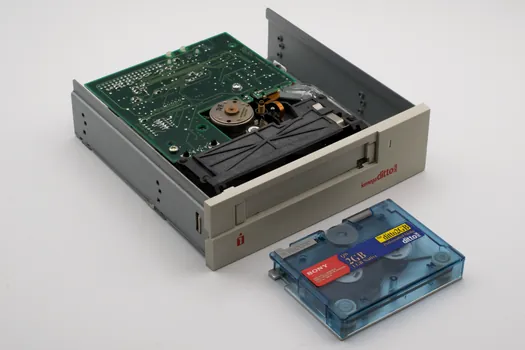
For many plants running older Rockwell gear, the only copy of the program lives inside the processor itself: no .RSS or .RSP file on a network share, no export in version control, no paper copy in a fireproof box; lose the processor and the line logic is gone with it [S4]. A usable backup confirms three things: the right software at a version that matches the file (RSLogix 5 for PLC-5, RSLogix 500 for SLC, Studio 5000 or the older RSLogix 5000 for ControlLogix), any processor password that was set, and rung comments plus tag descriptions intact so the file means something to the next engineer [S4].
Store the verified file in at least two physical locations, with one off-site, and rehearse the restore on a bench supply once a year; a backup that has never been opened is not a backup, it is a hope, and a PLC restore drill is the cheapest way to find that out before the line is dark.
Stockpile spares against MTBF, not against budget
The forum automation playbook calls the first short-term lever for any still-running obsolete PLC the stockpile of critical spares, sized to the mean time between failure of the parts most likely to fail on that specific platform [S2]. A practical starting list: one spare power supply per rack, one spare CPU per critical line, one set of each analog and digital input/output card type in use, at least one of every communication module, and a five-year supply of the lithium battery cell actually used in the platform [S2][S4].
Lead time is the real driver, not list price: parts pulled from a working-but-retired machine, a reputable surplus dealer, or a remanufactured exchange pool will keep a line alive long after the OEM has stopped building the card, and documenting the source of each spare is what keeps a maintenance manager out of trouble during an audit [S2][S5].
Bridge protocols with converters, do not rewrite the plant

Protocol converters and gateways are the second short-term lever for an obsolete PLC: they sit between the old controller and a modern HMI, SCADA or historian and translate legacy fieldbus or serial traffic into Ethernet/IP, OPC UA or MQTT without touching the ladder logic [S2]. For plants that need data off a PLC-5 or SLC 500 for an IIoT pilot, a converter is almost always cheaper and faster than a full migration, and it can be installed online with the line running [S2][S5].
Pick the converter on three criteria: protocol coverage for both ends of the link, tag-count headroom of at least 30 percent above current use, and a vendor that publishes a firmware roadmap rather than a one-time sale, because the gateway will outlive the controller it talks to and become part of the new system during the eventual cutover [S2][S5].
Tune the existing logic before you blame the hardware
The third short-term lever, often skipped, is a ladder-logic tune-up: simplify rungs, add diagnostic contacts, and document the program while the original equipment knowledge is still in the building [S2]. Many reported "obsolete PLC faults" on legacy hardware are actually scan-time overruns, watchdog trips, or integer-overflow bugs that surface only when the line duty cycle changes; tightening the code and adding one-shot diagnostics costs a few engineering days and can remove a fault that would otherwise be blamed on aging hardware [S2].
Document the I/O list, the fault bits, the operator messages, and the password recovery procedure in the same pass, because whoever owns the line after the current engineer retires is the person who will do the migration and they will start from the file you leave behind [S2][S4].
Stage the new PLC in parallel, then cut over on a planned shutdown
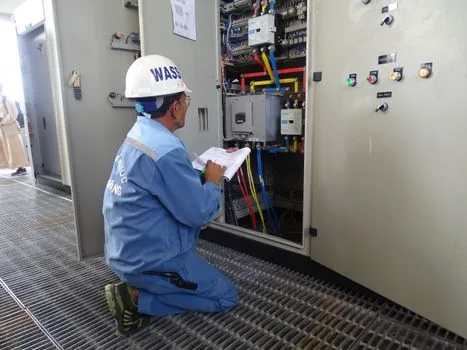
The long-term move is an organized plan, not a panic swap: pick a modern PLC with a published long-term-support window, rewrite the ladder logic, rewire or adapt the I/O to match the new platform and the existing field devices, then validate and train the operations team before any line sees the new controller [S2]. Migration projects range from a single-cell PLC upgrade to a plant-wide control system modernization, and the difference is mostly documentation discipline and staging space, not control theory [S3].
The lowest-risk sequence is: reverse-engineer the existing PLC and field I/O when schematics are missing, build a fresh set of electrical drawings as part of the deliverable, mount the new rack in a parallel cabinet with the same field terminals, run both controllers in monitor mode for a defined soak period, then transfer the line during a scheduled shutdown that already exists for another reason [S3][S4]. A well-planned migration replaces or stages out obsolete controllers, field I/O, and operator interfaces while preserving mechanical assets, and that mechanical-asset preservation is where the budget savings show up [S6].
Comparison: short-term bridge versus full migration on four decision criteria
On capital cost, the short-term bridge (spares, battery, protocol converter, backup) lands in the low thousands of dollars per line, while a full migration to a modern PLC is typically a six-figure project once engineering, downtime and rewiring are counted; on downtime exposure, the bridge adds minutes per fault, the migration adds hours during the cutover window, and a forced emergency migration adds days [S2][S3][S5]. On data visibility, a protocol converter immediately unlocks Ethernet/IP, OPC UA or MQTT from a controller that never had them, while a migration makes visibility a native feature of the new platform [S2][S5]. On risk, the bridge carries the risk of running out of spare parts or a sudden firmware-locked failure on legacy hardware, while the migration carries project-execution risk that drops sharply once the parallel-rack soak is complete and a written conversion procedure is in hand [S2][S3][S4][S5][S6].
What this bridge plan does not fix
A bridge plan does not repair the gap between legacy controllers and modern safety or cybersecurity standards; if the line is in scope for NFPA 70E arc-flash updates, OSHA machine-safety rules, or a plant-wide cyber-hardening program, the obsolete PLC has to come out on that schedule, not on its own [S5]. A bridge also does not give a processor that has already failed a second life: once the program is gone and the backup cannot be opened on the right software version, the line is down regardless of how many spares are on the shelf [S4]. Finally, a protocol converter is not a long-term replacement for native support of Ethernet/IP, OPC UA, or MQTT on the controller itself, and treating it as one is how plants end up running a 1990s CPU as the heart of a 2026 analytics stack [S5].
The next trackable signal is the OEM product-lifecycle page for each critical processor on the floor, refreshed quarterly, paired with a battery date-code log; a useful one to watch alongside this topic is the SCADA licensing and tag-limits comparison, because the SCADA tag count drives how much legacy data a converter can surface before a migration is forced.