An HMI touch panel, the human-machine interface, is the operator's window into a machine or process. It is a ruggedized touchscreen computer mounted in a control cabinet door or pendant that draws live graphics, reads and writes tags in a PLC, and records alarms, trends, and recipes. While the words HMI, operator panel, operator terminal, and graphic terminal are used interchangeably on purchase orders, the engineering distinction that matters is between a dedicated HMI running fixed firmware and a panel PC running a general-purpose operating system.
This page treats the HMI panel as a hardware category. The visual design discipline that runs on it, governed by ISA-101 and ISA-18.2, is just as important to operator safety as the screen specifications, so both threads appear below.
This guide is written for purchasing engineers and design engineers specifying machine and process visualization. It covers 6 chapters from panel categories, touch technologies, environmental and hazardous-area ratings, spec-sheet decoding, to selection decisions, with 7 FAQs and manufacturer comparisons. Environmental and design references include IEC 60529 (IP ratings), the UL 50E and NEMA Type rating system, IEC 60068-2 (vibration and shock), IEC 60079 with ATEX directive 2014/34/EU (hazardous areas), IEC 61131 (controller programming), and the ANSI/ISA-101 and ANSI/ISA-18.2 HMI and alarm standards.
Chapter 1 / 06
What is an HMI Touch Panel
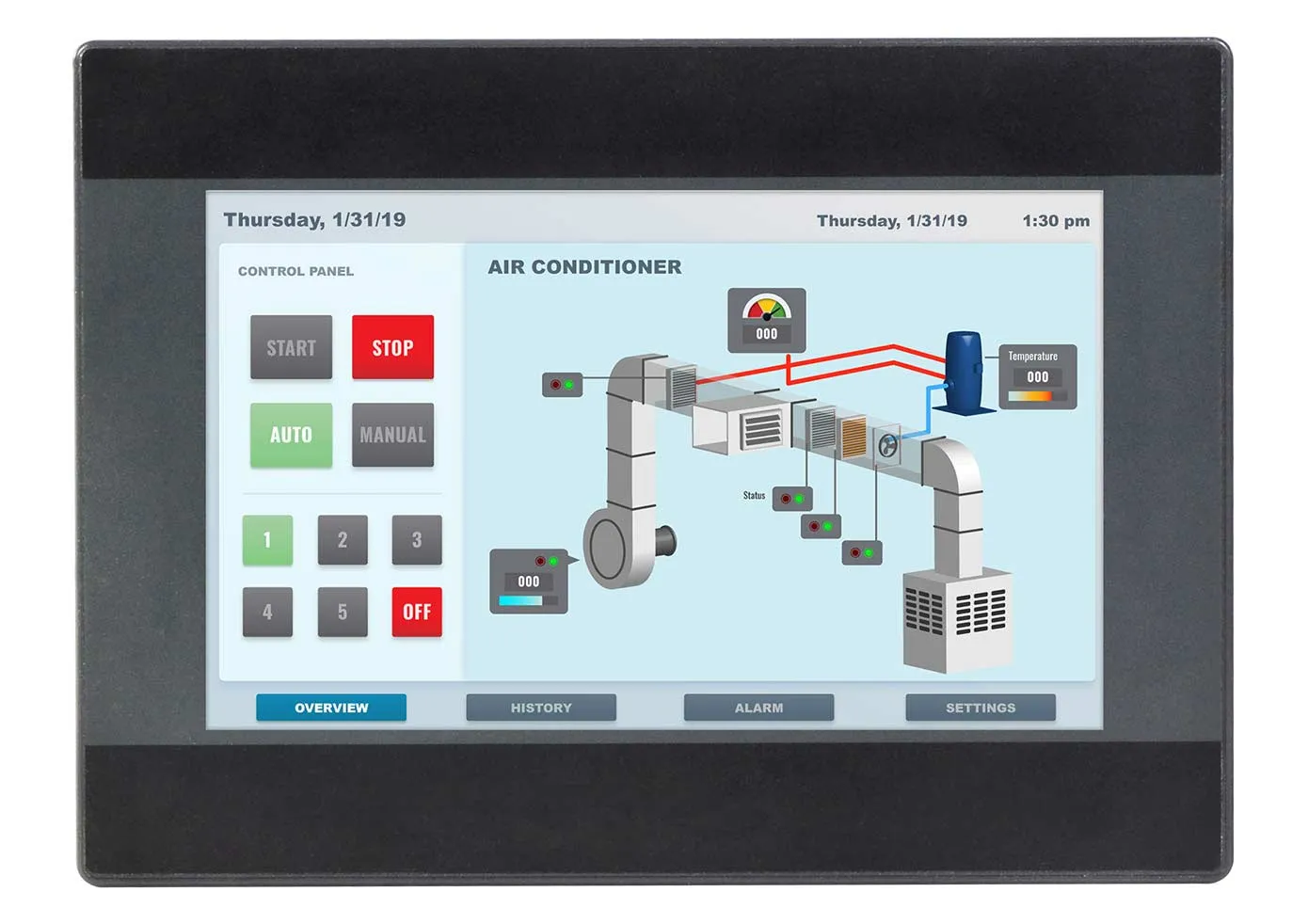
An HMI touch panel is the local operator interface for an automated machine or process. Physically it is a flat, sealed touchscreen device mounted in the cutout of a control cabinet door, a swing arm, or a pendant box. Functionally it does four jobs: it draws graphic screens that represent the equipment, it lets the operator issue commands by touch, it reads and writes data tags inside a programmable controller (PLC) over an industrial network, and it logs alarms, events, trends, and production recipes for the operator and for later analysis. The same controller it visualizes typically commands downstream equipment such as a motion controller, a servo drive, and position feedback from a rotary encoder, all of which the operator monitors through the HMI. It is the layer of the automation pyramid that sits directly above the controller and directly below plant-wide SCADA software.
Structurally an HMI panel has three layers stacked behind a sealed front bezel: (1) the display and touch stack, an LCD backlit by LEDs with a resistive film or a projected-capacitive glass sensor bonded over it; (2) the embedded computer, an ARM or x86 processor with flash storage, RAM, and a real-time graphics runtime; and (3) the communication and power section, with Ethernet and serial ports, USB, an SD or microSD slot, and a wide-range 24 V DC input. The whole assembly is gasketed so the operator-facing surface resists dust and washdown while the back of the unit lives inside the protected cabinet.
The key engineering distinction is firmware HMI versus panel PC. A dedicated HMI runs a closed firmware runtime built for one purpose and configured by a vendor engineering tool: Siemens WinCC in TIA Portal for SIMATIC panels, Rockwell View Designer or FactoryTalk View ME for PanelView, Weintek EasyBuilder Pro for cMT and MT, or Schneider GP-Pro EX for Pro-face. It boots in seconds, has no Windows to patch, and is deterministic and low-maintenance. A panel PC, by contrast, runs Windows IoT or Linux on industrial-grade hardware and can host SCADA clients, MES, databases, and edge analytics alongside the HMI. The trade is flexibility against attack surface and maintenance overhead.
The history of the operator panel tracks the history of the PLC itself. Early 1970s control panels were hard-wired arrays of pushbuttons, pilot lights, and analog meters. As Modicon and Allen-Bradley PLCs spread through the 1980s, text-only operator terminals with vacuum-fluorescent or character LCD displays replaced banks of indicator lamps. Color graphic terminals with resistive touch arrived in the 1990s, and through the 2000s TFT color, Ethernet, and web servers became standard. The current generation, exemplified by Siemens Unified Comfort and Rockwell PanelView 5000, uses projected-capacitive multi-touch glass, gesture support, HTML5 web clients, and built-in security and OPC UA connectivity.
Four engineering metrics decide whether an HMI panel will serve well over a ten-year machine life: display readability over the viewing distance and ambient light, touch technology matched to how the operator works (gloved or bare-handed, clean or washdown), environmental sealing and temperature range matched to the installation, and ecosystem fit with the chosen PLC and SCADA. A panel that wins on raw display specs but lacks a native driver for the plant's controller will cost far more in engineering time than it saved at purchase.
Chapter 2 / 06
HMI Panel Types and Form Factors
HMI hardware splits into four practical categories by how much computing it carries and how it is configured. Choosing the wrong category is the most expensive early mistake, because it locks in the engineering toolchain and the maintenance model for the life of the machine. The table below compares the four categories on the dimensions that drive selection.
Category
Runtime / OS
Configured with
Best fit
Dedicated HMI panel
Closed firmware runtime
Vendor tool (WinCC, EasyBuilder)
Machine-level visualization tied to one PLC
Panel PC (open HMI)
Windows IoT or Linux
SCADA package or custom app
HMI plus SCADA, MES, or edge analytics
Web / edge HMI
Firmware with HTML5 client
EasyBuilder web, browser kiosk
Thin client to a web server or SCADA
Key / membrane panel
Closed firmware runtime
Vendor tool
Heavy-glove or no-touch duty, fixed keys
Dedicated HMI panels are the workhorse of machine building. They are fanless, sealed, and boot in seconds into a single graphics runtime. Siemens SIMATIC Basic and Comfort, Rockwell PanelView 800 and 5500, Schneider Pro-face GP, Mitsubishi GOT, Omron NB and NA, Beijer X2, Delta DOP, and Weintek cMT and MT all belong here. They connect over EtherNet/IP, PROFINET, Modbus TCP, or serial protocols to one or a few PLCs, and they are configured offline in a vendor tool. They cannot run third-party software, which is precisely why they are reliable and low-maintenance.
Panel PCs are industrial computers in a touchscreen housing. Because they run a full Windows IoT or Linux operating system, they can host a SCADA runtime, an MES client, a database, or edge analytics on the same hardware as the HMI. Advantech, Beckhoff, Pro-face, and many Siemens and Rockwell industrial-PC lines serve this segment. The cost is operating-system maintenance: patching, antivirus, storage wear management, and a longer boot. They are the right answer when the local interface must do more than draw screens.
Web and edge HMI panels are a newer hybrid. They run a sealed firmware that includes an HTML5 browser, so the panel itself stores little or nothing and instead displays pages served by a SCADA system, a PLC web server, or a cloud dashboard. Weintek cMT-X and Beijer X2 web are representative: the X2 web range runs a Chromium kiosk pointed at a target web address, while Weintek cMT-X web models offer 1280x800 and 1920x1080 displays driving real-time PLC and SCADA pages. This category suits distributed plants that want one source of truth on a web server rather than a copy of the project in every panel.
Key and membrane panels keep physical buttons, either alongside a touchscreen or instead of one. They exist because some duties forbid a touchscreen: heavy chemical gloves, freezing cold stores where bare fingers are unsafe, or safety functions that demand a guarded physical button. Siemens KP and KTP Comfort key panels and Rockwell PanelView keypad terminals serve this need. Function keys give tactile, eyes-free operation that a flat glass surface cannot match.
Chapter 3 / 06
Touch Technologies and Displays
The touch sensor and the display behind it determine how the operator interacts and how the panel survives. Two touch technologies dominate industrial HMI: resistive and projected capacitive (PCAP). They differ in physics, in how they tolerate gloves and contamination, and in surface durability. The table below compares the two on the metrics that matter on a factory floor.
Property
Resistive
Projected capacitive (PCAP)
Sensing
Pressure shorts two films
Field change from a conductor
Front surface
Flexible PET film
Strengthened glass
Gloved use
Any glove, any object
Needs glove or wet mode
Multi-touch / gesture
Single point only
Multi-touch, pinch, swipe
Water on surface
Tolerant
Needs rejection firmware
Rated touch life
5 to 35 million touches
10 to 50 million touches
Relative cost
Lower (30 to 50% less)
Higher
Resistive touch uses two transparent conductive layers, usually indium tin oxide on PET film and glass, separated by microscopic spacer dots. Pressing the front layer makes contact with the back layer, and the controller reads the contact point from the resulting voltage divider. Because it responds to pressure from anything, it works with thick gloves, a stylus, a fingernail, or a wet finger, and it is the cheaper option. The cost is a flexible film front that scratches and yellows over time, single-point operation with no gestures, and a service life on the order of 5 to 35 million touches at one point. It remains the default for low-cost machine panels and heavy-glove duties.
Projected capacitive (PCAP) places a grid of transparent electrodes under chemically strengthened glass and senses the small capacitance change a conductive finger makes in the field. The glass front resists scratches and chemicals, the technology supports multi-touch and gestures, and rated life runs higher, on the order of 10 to 50 million activations. The historical weaknesses, gloved hands and standing water, are now addressed by tunable controllers with glove modes and water-rejection algorithms that handle most factory gloves and washdown. PCAP is the choice for clean rooms, food and pharma, premium machine interfaces, and any panel where a glass front and gesture support are wanted.
Behind the touch sensor is the display itself, almost always an LED-backlit TFT LCD of the same family used in a standalone industrial display. The parameters that decide readability are brightness, resolution, contrast, and viewing angle. Brightness is measured in nits (candela per square meter): 250 to 400 nits suits an indoor cabinet, while sunlight-readable outdoor panels need 700 nits or more, often with optical bonding to cut reflection. Resolution should be high enough that a 16-pixel UI font is legible at the operator's working distance. Wide viewing angles, up to roughly 89 degrees on premium web panels, matter when the operator approaches the cabinet from the side rather than straight on.
Optical bonding deserves a note because it changes both readability and durability. In a bonded display the touch glass is laminated to the LCD with a clear adhesive that removes the air gap. This kills internal reflections for better sunlight readability, prevents condensation forming inside the gap in temperature-cycling environments, and stiffens the assembly against impact. It costs more and complicates repair, so it is specified where outdoor light, cold-store condensation, or vibration would otherwise degrade a standard air-gap stack.
Chapter 4 / 06
Environmental and Hazardous-Area Ratings
An HMI panel lives where the machine lives: a humid washdown line, a dusty quarry, a cold store, a vibrating mobile machine, or a hazardous-area process unit. The environmental ratings on the datasheet decide whether the panel survives there, and reading them precisely avoids both field failures and overspending. The two rating systems an engineer must read are ingress protection (IEC 60529 IP codes and the North American NEMA Type system) and hazardous-area classification (Division and Zone schemes).
Ingress protection under IEC 60529 is a two-digit IP code. The first digit is solids, where 6 means fully dust-tight, and the second digit is liquids. IP65 means dust-tight plus protection against low-pressure water jets from any direction, which covers the great majority of indoor factory fronts. IP66 withstands powerful jets, suiting heavier washdown. A crucial subtlety: HMI bezels usually carry the IP65 or IP66 rating only on the front face, gasketed into the panel cutout, while the rear of the unit inside the cabinet is often only IP20. The front protects the operator side, the enclosure protects the back.
NEMA Type ratings are the North American equivalent under UL 50E and overlap, but do not map one to one, with IP codes. NEMA Type 4 corresponds roughly to IP66 with added hose-down and external-ice provisions, and Type 4X adds corrosion resistance for washdown, food and beverage, marine, and outdoor use. Type 12 covers indoor dust and dripping liquids without the hose-down requirement. Because the test methods differ, a single conversion number is approximate; specify the actual standard, IP or NEMA, that your project or AHJ requires rather than relying on a cross-reference.
The table below summarizes the common environmental and certification lines on an HMI datasheet and what each one governs, so you can scan a specification quickly during selection.
Spec line
Standard
What it governs
Front ingress
IEC 60529 / UL 50E
IP65, IP66, or NEMA 4 / 4X / 12 sealing of the face
Operating temperature
Vendor / IEC 60068-2
0 to 50 C standard, 0 to 55 C process
Vibration
IEC 60068-2-6
Sine vibration endurance, often a few g, 5 to 150 Hz
Shock
IEC 60068-2-27
Mechanical shock survival
Hazardous area
IEC 60079 / ATEX 2014/34/EU
Class I Div 2 or Zone 2 / Zone 22 marking
EMC
IEC 61000 series
Emissions and immunity for the CE mark
Hazardous-area classification applies only when flammable gas, vapor, or combustible dust may be present. North American practice uses Class I (gases and vapors) and Class II (combustible dusts), each split into Division 1 (hazard present in normal operation) and Division 2 (present only under abnormal conditions). The IEC and European framework uses Zones: Zone 0, 1, 2 for gas and Zone 20, 21, 22 for dust, certified under the ATEX directive 2014/34/EU and the international IECEx scheme against the IEC 60079 series. Most plant HMIs sit in safe areas and need no Ex marking. When a panel must be installed on the hazardous side, specify a purpose-built unit carrying UL Class I Division 2 or ATEX Zone 2 and Zone 22 marking, typically combined with a NEMA 4X or IP66 housing, rather than retrofitting a standard panel into a purged enclosure.
Two further environmental lines deserve attention. Operating and storage temperature are different numbers: a panel rated 0 to 50 degrees Celsius operating may tolerate storage colder than that, but an LCD can be permanently damaged if stored or cold-started below its minimum, so cold-store and outdoor installations need an extended-temperature model, roughly minus 20 to plus 60 degrees, sometimes with an internal heater. EMC compliance under the IEC 61000 series, required for the CE mark, governs how the panel behaves near variable-frequency drives and welding equipment, which are notorious sources of electrical noise on a factory floor.
Chapter 5 / 06
Key Specification Parameters
An HMI datasheet can list thirty parameters, but only a handful actually drive a selection decision. The parameters below are the ones to extract and compare across candidate panels. The first table groups the headline display and compute specifications across common screen sizes, so you can see how resolution and form factor scale together.
Screen size
Typical resolution
Typical touch
Typical use
4.3 in
480 x 272
Resistive or PCAP
Single machine, few setpoints
7 in
800 x 480
Resistive or PCAP
Machine cell, basic trends
10 to 12 in
1280 x 800
PCAP common
Line cell or skid, recipes
15 in
1366 x 768
PCAP
Process unit, multi-screen
19 to 21.5 in
1920 x 1080
PCAP multi-touch
Control desk overview, ISA-101
Display size, resolution, and brightness are the first triplet. Size follows viewing distance and information density: 4 to 7 inch for a single machine at arm's length, 10 to 15 inch for a cell or skid, 19 to 22 inch for a control-desk overview. Resolution must keep a 16-pixel font legible at that distance. Brightness in nits must beat the ambient light: 250 to 400 nits indoors, 700 nits or more for sunlight or bright washdown. Aspect ratio matters too, because widescreen 16:9 panels suit ISA-101 overview layouts while legacy 4:3 panels suit ported older projects.
Processor, memory, and storage set how complex a project the panel can run and how smoothly it animates. Entry panels use ARM Cortex-A class processors; web and panel-PC class units use quad-core ARM or x86 silicon with 1 to 4 GB of RAM. Project storage and a removable SD or microSD slot for logging and backup are standard. A panel that stutters when redrawing a busy trend screen is usually short on processor or RAM for the project, so size compute to the heaviest screen, not the average.
Communication ports and protocols are often the deciding spec, because the panel is useless if it cannot talk to the controller. Look for the number of Ethernet ports and whether they support ring topologies such as Device Level Ring (DLR) for resilient networks built on managed industrial Ethernet switches, the serial ports (RS-232, RS-422, RS-485) for legacy PLCs, USB host and device ports, and the supported drivers: EtherNet/IP, PROFINET, Modbus TCP and RTU, OPC UA, and vendor-native protocols. PanelView 5500, for example, provides dual 10/100 Ethernet supporting DLR, linear, or star topology.
Software, capacity, and security close the list. Each panel family has an engineering tool and a runtime, and the runtime imposes limits worth checking against the application: PanelView 5500 documentation cites limits such as a maximum number of user-defined screens and Logix-based alarms per terminal. Modern panels add transport-layer security, user roles, and audit trails to meet IEC 62443 industrial cybersecurity expectations. The power input is almost always 24 V DC over an 18 to 30 V range, with the current and wattage on the datasheet sizing the cabinet supply.
Beyond the hardware, the discipline that runs on the panel decides whether operators perform well under stress. ANSI/ISA-101 governs HMI design as a lifecycle: freeze a style guide of colors, fonts, symbols, and naming, then build a display hierarchy of Level 1 area overview, Level 2 unit, and Level 3 detail so operators move from awareness to action quickly. ANSI/ISA-18.2 governs alarm management so the operator is not flooded. The two coordinate to show the right alarm at the right priority on the right display, which directly reduces error during process upsets. A premium panel running a poorly designed screen is still a poor interface.
Chapter 6 / 06
Selection Decision Factors
To turn the preceding chapters into a specific model, follow the decision sequence below. Most HMI selection regret comes not from a wrong display spec but from an early ecosystem or environment mismatch, so resolve the top items before chasing screen numbers. These steps double as a fixed RFQ template.
Ecosystem and protocol fit: Identify the PLC and SCADA already in the plant and pick a panel with a native driver and a mature engineering tool for it. Siemens panels with WinCC for S7 controllers, Rockwell PanelView for Logix, or a multi-vendor panel such as Beijer, Weintek, or Pro-face when the controller mix is mixed. This decision dominates engineering cost.
Panel category: Decide among dedicated HMI, panel PC, web or edge HMI, and key or membrane panel per Chapter 2. This sets the maintenance model and the toolchain for the machine's life.
Screen size, resolution, and brightness: Match the diagonal to viewing distance and information density, the resolution to font legibility, and the nits to the ambient light, including any sunlight or washdown lighting.
Touch technology: Resistive for heavy-glove, single-touch, cost-driven duty; projected capacitive for glass front, gestures, washdown, and premium interfaces, confirming glove and water modes if the environment needs them.
Environmental and ingress rating: Specify front IP65 or IP66, or NEMA 4 / 4X / 12, to match washdown and dust; confirm operating and storage temperature for cold or hot installations; check vibration and shock for mobile or high-vibration machinery.
Hazardous-area certification: Only if the panel is on the hazardous side, specify UL Class I Division 2 or ATEX and IECEx Zone 2 / Zone 22 marking. Most panels in safe areas need none.
Compute, ports, and capacity: Size processor and RAM to the heaviest screen, confirm the count of Ethernet and serial ports and ring-topology support, and verify the runtime screen, tag, and alarm limits against the application.
Design standards and security: Plan the screens to ANSI/ISA-101 and the alarms to ANSI/ISA-18.2, and require IEC 62443-aligned security features (user roles, TLS, audit trail) for any networked panel.
One last dimension is often overlooked: manufacturer serviceability and lifecycle. An HMI installed today must be supportable for a decade, so weigh the vendor's spare-parts availability, the long-term support window for the panel family and its engineering software, firmware and security-patch cadence, and local field-service coverage. Siemens, Rockwell, Schneider, Mitsubishi, Omron, Beijer, and Weintek all maintain support and distribution networks in China and globally, which makes them dependable choices for projects that must outlive several product refresh cycles. A panel that is cheaper today but discontinued in three years can strand an entire machine fleet when a replacement no longer reads the legacy project file.
FAQ
What is the difference between an HMI panel and a panel PC?
A dedicated HMI panel runs a fixed firmware runtime built for a single job: drawing screens, reading and writing PLC tags, and logging alarms. It is fanless, boots in seconds, has no general-purpose operating system to patch, and is configured by a vendor tool such as Siemens WinCC, Rockwell View Designer, or Weintek EasyBuilder. A panel PC is a full industrial computer with an x86 or ARM processor running Windows IoT or Linux, capable of hosting SCADA, MES clients, databases, and edge analytics alongside the HMI runtime. The trade is flexibility against attack surface and maintenance: panel PCs need OS patching, antivirus, and storage management, while dedicated panels trade that away for deterministic, low-maintenance operation. Choose a dedicated panel for machine-level visualization and a panel PC when you need to run additional software on the same hardware.
Should I choose resistive or projected capacitive touch?
Resistive touch detects the pressure of any object, so it works with thick gloves, a stylus, a knuckle, or a wet finger, and costs roughly 30 to 50 percent less. Its film surface scratches over time and its rated life is on the order of 5 to 35 million touches at one point. Projected capacitive (PCAP) senses the electric field of a conductor through a chemically strengthened glass front, giving a scratch-resistant surface, multi-touch gestures, and a much higher activation life, but it traditionally struggled with thick gloves and standing water. Modern multi-layer PCAP controllers now offer glove and water-rejection modes that handle most factory gloves and washdown. Pick resistive for heavy-glove, single-touch, cost-driven machine panels, and PCAP for clean rooms, food and pharma washdown, and any interface where a glass front and gesture support matter.
What do IP65, NEMA 4, and NEMA 4X mean for an HMI front panel?
IP65 is defined by IEC 60529. The first digit 6 means dust-tight, and the second digit 5 means protected against low-pressure water jets from any direction, which suits most indoor factory fronts exposed to splash and dust. IP66 raises the second digit to withstand powerful water jets. NEMA ratings are the North American equivalent under UL 50E: NEMA Type 4 corresponds roughly to IP66 with hose-down and ice protection, and Type 4X adds corrosion resistance for washdown, food, and outdoor use. A key point is that almost every HMI front bezel carries IP65 or IP66 only on the front face when correctly gasketed in the cutout; the rear housing inside the cabinet is typically IP20. So the panel protects the operator side, and the enclosure protects the back.
How do I size the screen and resolution for an HMI?
Map the operator distance and information density to a diagonal. A 4 to 7 inch panel suits a single machine with a handful of setpoints viewed at arm's length. A 10 to 15 inch panel fits a line cell or skid with trends and recipe screens. A 19 to 22 inch widescreen panel suits a control desk overview that follows ISA-101 display hierarchy. For resolution, common steps are 480x272 on 4.3 inch, 800x480 on 7 inch, 1280x800 on 10 to 12 inch, and 1920x1080 on 15 inch and larger. Choose a resolution high enough that a 16-pixel font is legible at the viewing distance, and confirm the brightness in nits is sufficient: 250 to 400 nits indoors, and 700 nits or more if the panel faces sunlight or bright washdown lighting.
What temperature and vibration ratings does an HMI need?
Standard commercial HMI panels operate from 0 to 50 degrees Celsius, which covers a climate-controlled control room or an enclosed cabinet with ventilation. Process and machine panels are commonly rated 0 to 55 degrees, as on the Rockwell PanelView 5500. Outdoor, cold-store, and engine-bay duty needs an extended-temperature panel rated roughly minus 20 to plus 60 degrees, sometimes minus 30, often with a heater for cold start of the LCD. For vibration and shock, look for compliance with IEC 60068-2-6 sine vibration, typically a few g over 5 to 150 Hz, and IEC 60068-2-27 shock. Mobile machinery and rail add EN 50155 or the relevant vehicle standard. Always confirm the storage temperature too, because LCDs can be damaged when stored colder than their operating minimum.
Do I need ATEX or Class I Division 2 certification for my HMI?
Only if the panel is installed in an area where flammable gas, vapor, or combustible dust may be present. North American practice classifies these as Class I (gases) or Class II (dusts), Division 1 (present in normal operation) or Division 2 (present only under fault). The European and IEC framework uses Zones: Zone 1 and Zone 2 for gas, Zone 21 and Zone 22 for dust, certified under ATEX directive 2014/34/EU and the IECEx scheme against the IEC 60079 series. Most plant HMIs sit in safe areas and need no Ex rating. When the panel must be on the hazardous side, specify a purpose-built unit carrying UL Class I Division 2 or ATEX Zone 2 and Zone 22 marking, usually with NEMA 4X and IP66 housing, rather than trying to retrofit a standard panel into a purged enclosure.
Which manufacturers are mainstream for industrial HMI panels?
For PLC-tied machine and process panels, Siemens SIMATIC (Basic, Comfort, and Unified Comfort, configured in WinCC TIA Portal) and Rockwell Automation Allen-Bradley PanelView (800, 5000, and 5500, configured in View Designer or FactoryTalk View ME) dominate where the controller is from the same vendor. Schneider Electric Pro-face, Mitsubishi GOT, Omron NB and NA, and Beijer X2 cover broad multi-vendor PLC connectivity. For cost-sensitive OEM machine builders, Weintek (cMT and MT series with EasyBuilder Pro) and Delta DOP are widely used in Asia. For panel PCs running Windows or Linux HMI, Advantech, Pro-face, and Beckhoff are common. Match the panel brand to your PLC and SCADA ecosystem first, because driver support and engineering-tool integration matter more than raw display specifications.
HMI Touch Panel Manufacturers
Source-backed product routes. Open a company dossier for procurement scope and cited evidence.





/Series_Card_cMT3108XP%20(iV).png)